
Step 1: Install Applicare SingleAgent on the machine where Java application is running. Follow the installation instructions for Installing Applicare SingleAgent
Step 2: Run the JAR file directly with Applicare SingleAgent.
Step 3: Assuming javaapp.jar is the executable JAR application that needs to be monitored, Use the following command to run the JAR.
To deploy Applicare SingleAgent, run the Java Application with the following arguments:
- -noverify
- -javaagent:<ApplicareAgentDir>\applicare-aspects.jar=verbosity=0,logfile=false,norestart-intellitrace=false
- -Darcturus_home=<ApplicareAgentDir>
- -Dapplicare.agent.host=HOST_NAME
- -Djava.library.path=.;<ApplicareAgentDir>\bin
- -Dlogback.configurationFile=<ApplicareAgentDir>\logback\logback.xml
e.g. java -jar -noverify -javaagent:G:\ApplicareSingleAgent\applicare-aspects.jar=verbosity=0,logfile=false,norestart-intellitrace=false -Dapplicare.agent.host=HOST_NAME -Darcturus_home=G:\ApplicareSingleAgent -Djava.library.path=.;G:\ApplicareSingleAgent\bin -Dlogback.configurationFile=G:\ApplicareSingleAgent\logback\logback.xml javaapp.jar
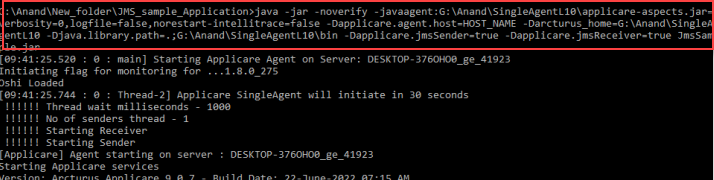
Few JVM Arguments
a) To enable IntelliTrace add -DenableIntellitraceDaemon=true to startup arguments.
If Java Application is running as a service follow the steps in the below link.
Java Application running as a service
Another steps to install Applicare SingleAgent with Wrapper.