
Run the Applicare Controller as a service on Linux

To install or uninstall applicare.service, admin permissions are required.

1. Navigate to the directory where the Applicare Controller is installed.

2. Run ./installControllerService.sh to install applicare.service. This command will both install and start the service.

Screenshot 1 — Run the Applicare Controller as a service on Linux

1. To view service status execute the command systemctl status applicare
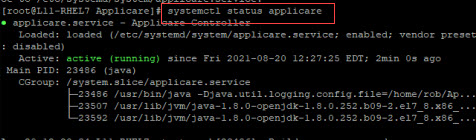
Screenshot 2 — Run the Applicare Controller as a service on Linux

2. To Stop service execute the command systemctl stop applicare

Screenshot 3 — Run the Applicare Controller as a service on Linux

3. To Start service execute the command systemctl start applicare

Screenshot 4 — Run the Applicare Controller as a service on Linux

4. To Uninstall service execute ./uninstallControllerService.sh

Screenshot 5 — Run the Applicare Controller as a service on Linux

Was this article helpful?

Votes and follows are kept by Zendesk, so they need a Help Center account. These buttons open this article there.

Opens Zendesk · needs internet and sign-in

Still stuck? Contact support