
Step 1: Before backing up the database, create the applicarearchive schema, execute the applicare-related sql's and ensure all tables are created.
Step 2: Connect to the database via MySQL Workbench, open a new SQL query tab, and execute the following command.
NOTE: Replace the <targetDB> placeholder with actual backup database name before running the query.
DELIMITER //
DROP PROCEDURE IF EXISTS applicarearchive.sp_MasterArchive_Int_Profiling //
CREATE PROCEDURE applicarearchive.sp_MasterArchive_Int_Profiling()
BEGIN
   DECLARE v_done INT DEFAULT FALSE;
   DECLARE v_table_name VARCHAR(255);
   DECLARE v_id_col VARCHAR(100);
   DECLARE v_time_col VARCHAR(100);
   DECLARE v_source_db VARCHAR(100) DEFAULT '<targetDB>';
   DECLARE v_backup_db VARCHAR(100) DEFAULT 'applicarearchive';

   -- DATA MAP for selected tables only
   DECLARE table_cursor CURSOR FOR
       SELECT * FROM (
           SELECT 'intellitrace_errors' as t, 'id' as i, 'excep_at' as c UNION
           SELECT 'alert_queue', 'id', 'created_time' UNION
           SELECT 'int_profiling_hist', 'rl', 'from_time'
       ) mapping;

   DECLARE CONTINUE HANDLER FOR NOT FOUND SET v_done = TRUE;

   -- Ensure custom log table exists
   CREATE TABLE IF NOT EXISTS applicarearchive.archive_logcustom (
       id INT AUTO_INCREMENT PRIMARY KEY,
       table_name VARCHAR(255),
       rows_moved INT,
       sync_time TIMESTAMP DEFAULT CURRENT_TIMESTAMP,
       status VARCHAR(255)
   );

   -- Target exactly 31 days ago (30 days before yesterday)
   SET @start_val = CONCAT(CURDATE() - INTERVAL 38 DAY, ' 00:00:00');
   SET @end_val   = CONCAT(CURDATE() - INTERVAL 38 DAY, ' 23:59:59');

   OPEN table_cursor;
   read_loop: LOOP
       FETCH table_cursor INTO v_table_name, v_id_col, v_time_col;
       IF v_done THEN LEAVE read_loop; END IF;

       SET @rows_affected = 1;
       SET @total_moved = 0;

       -- Move data in batches of 10,000 to prevent lag/locking
       WHILE @rows_affected > 0 DO
           SET @move_sql = CONCAT(
               'INSERT INTO ', v_backup_db, '.', v_table_name,
               ' SELECT * FROM ', v_source_db, '.', v_table_name,
               ' WHERE ', v_time_col, ' BETWEEN ? AND ? ',
               ' AND ', v_id_col, ' NOT IN (SELECT ', v_id_col, ' FROM ', v_backup_db, '.', v_table_name, ') ',
               ' LIMIT 10000'
           );
           PREPARE m_stmt FROM @move_sql;
           EXECUTE m_stmt USING @start_val, @end_val;
           SET @rows_affected = ROW_COUNT();
           SET @total_moved = @total_moved + GREATEST(0, @rows_affected);
           DEALLOCATE PREPARE m_stmt;
       END WHILE;

       -- Log result into custom log table
       INSERT INTO applicarearchive.archive_logcustom (table_name, rows_moved, status)
       VALUES (
           CONCAT(v_table_name, ' (via ', v_time_col, ')'),
           @total_moved,
           IF(@total_moved > 0, 'SUCCESS', 'NO NEW DATA')
       );
   END LOOP;
   CLOSE table_cursor;
END //
DELIMITER ;
NOTE: The query above only backs up data from the few tables, rather than the entire database.
If you want to run the above stored procedure manually, execute the query below.
CALL applicarearchive.sp_MasterArchive_Int_Profiling();Step 3: Run the query below to enable the MySQL Event Scheduler and schedule the sp_BatchArchiveYesterday procedure to run daily at 1:00 AM.
SET GLOBAL event_scheduler = ON;
DELIMITER //
DROP EVENT IF EXISTS applicarearchive.daily_archive_at_1am //
CREATE EVENT applicarearchive.daily_archive_at_1am
ON SCHEDULE EVERY 1 DAY
STARTS (CURRENT_DATE + INTERVAL 1 DAY + INTERVAL 1 HOUR)
DO
  BEGIN
    TRUNCATE TABLE applicarearchive.archive_log;
    CALL applicarearchive.sp_MasterArchive_Final();
  END //

DELIMITER ;
To modify the scheduled time, first execute the query below to drop the existing event, then re-create it with your desired schedule.
DROP EVENT IF EXISTS applicarearchive.daily_archive_at_1am;To change the time to 8:00 PM, We need to adjust the INTERVAL in the STARTS clause. Since MySQL uses a 24-hour format, 8:00 PM is 20 hours.
e.g.
SET GLOBAL event_scheduler = ON;
DELIMITER //
DROP EVENT IF EXISTS applicarearchive.daily_archive_at_8pm //
CREATE EVENT applicarearchive.daily_archive_at_8pm
ON SCHEDULE EVERY 1 DAY
STARTS (CURRENT_DATE + INTERVAL 1 DAY + INTERVAL 20 HOUR)
DO
  BEGIN
    TRUNCATE TABLE applicarearchive.archive_log;
    CALL applicarearchive.sp_MasterArchive_Final();
  END //

DELIMITER ;
NOTE: Execute the below query to confirm the event is saved in the system.
SHOW EVENTS FROM applicarearchive;
Step 4: We need to create the archive_log table in your archive database. This table will record which table was processed, how many rows were moved, and exactly when it finished.
CREATE TABLE IF NOT EXISTS applicarearchive.archive_logcustom (
    id INT AUTO_INCREMENT PRIMARY KEY,
    table_name VARCHAR(255),
    rows_moved INT,
    finish_time TIMESTAMP DEFAULT CURRENT_TIMESTAMP,
    status VARCHAR(255)
);
Explanation of the Columns:
id: A unique number for every entry.
table_name: Records the table name (and the column name used, e.g.,
oshistory_detail [dt]).rows_moved: The number of records successfully transferred for "Yesterday".
finish_time: The exact date and time the backup for that specific table completed.
Step 5: Execute query to see the results. It will show you the most recent backups at the top.
SELECT * FROM applicarearchive.archive_log ORDER BY finish_time DESC;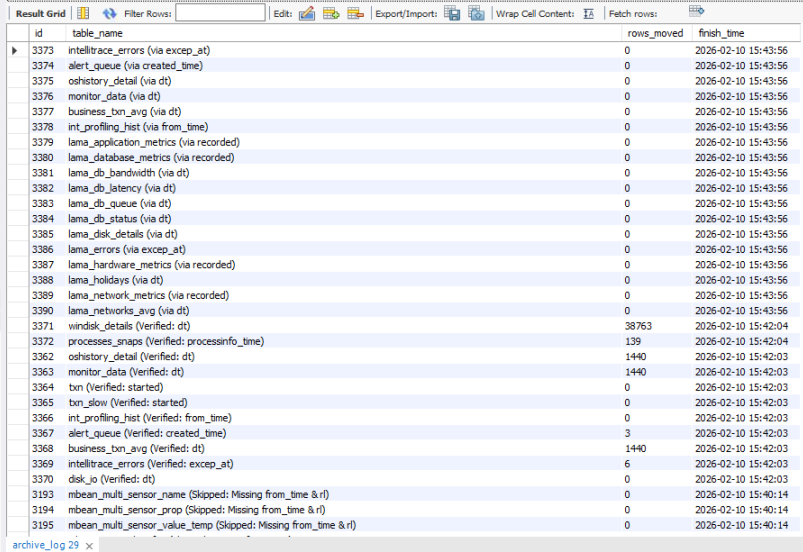
Step 6: Use this query to list all active events within the applicarearchive schema.
SHOW EVENTS FROM applicarearchive;