Step 1: Before backing up the database, create the applicarearchive schema, execute the applicare-related sql's and ensure all tables are created.
Step 2: Connect to the database via MySQL Workbench, open a new SQL query tab, and execute the following command.
NOTE: Replace the <targetDB> placeholder with actual backup database name before running the query.
DELIMITER //
DROP PROCEDURE IF EXISTS applicarearchive.sp_MasterArchive_Settings //
CREATE PROCEDURE applicarearchive.sp_MasterArchive_Settings()
BEGIN
  DECLARE v_done INT DEFAULT FALSE;
  DECLARE v_table_name VARCHAR(255);
  DECLARE v_source_db VARCHAR(100) DEFAULT '<targetDB>';
  DECLARE v_backup_db VARCHAR(100) DEFAULT 'applicarearchive';
  DECLARE v_columns TEXT;

  -- Full Table List
  DECLARE table_cursor CURSOR FOR
      SELECT tname FROM (
          SELECT 'mg_dash_config' AS tname UNION SELECT 'mg_dash_exclude_api' UNION SELECT 'mg_dash_property' UNION
          SELECT 'server' UNION SELECT 'application' UNION SELECT 'settings' UNION SELECT 'user_settings' UNION
          SELECT 'configs_modified_time' UNION SELECT 'aop_config' UNION SELECT 'op_center_config' UNION
          SELECT 'eum_url' UNION SELECT 'monitor_config' UNION SELECT 'btm_txn_settings' UNION
          SELECT 'business_transaction' UNION SELECT 'web_transaction' UNION SELECT 'java_transaction' UNION
          SELECT 'processes_to_monitor' UNION SELECT 'lamaconfig' UNION SELECT 'lamaconfig_apps' UNION
          SELECT 'lamaconfig_snmpapps' UNION SELECT 'lama_errors' UNION SELECT 'lama_holidays' UNION
          SELECT 'apiconfig' UNION SELECT 'api_threshold' UNION SELECT 'api_exclude_api' UNION
          SELECT 'api_count_alert_config' UNION SELECT 'mbean_prop_identifier' UNION
          SELECT 'runtime_mbean_properties' UNION SELECT 'runtime_mbean_types' UNION
          SELECT 'mbean_prop_persisted' UNION SELECT 'alert_definitions' UNION SELECT 'reports_schedule' UNION
          SELECT 'reports_scheduler' UNION SELECT 'log_monitor' UNION SELECT 'log_alerts' UNION
          SELECT 'log_file' UNION SELECT 'log_patterns' UNION SELECT 'login_stat' UNION
          SELECT 'user_actions' UNION SELECT 'user_applications' UNION SELECT 'user_roles' UNION
          SELECT 'user_subscription' UNION SELECT 'users' UNION SELECT 'users_login_info' UNION
          SELECT 'ldap_user' UNION SELECT 'ldap_user_applications' UNION SELECT 'ldap_user_role' UNION
          SELECT 'single_sign_user' UNION SELECT 'single_sign_user_applications' UNION
          SELECT 'single_sign_user_role' UNION SELECT 'server_availability_config' UNION
          SELECT 'server_details' UNION SELECT 'server_domain' UNION SELECT 'session_info' UNION
          SELECT 'kubernetes_config' UNION SELECT 'aws_user'
      ) mapping;

  DECLARE CONTINUE HANDLER FOR NOT FOUND SET v_done = TRUE;
  -- Ensure Log table exists
  CREATE TABLE IF NOT EXISTS applicarearchive.archive_log (
      id INT AUTO_INCREMENT PRIMARY KEY,
      table_name VARCHAR(255),
      rows_moved INT,
      sync_time TIMESTAMP DEFAULT CURRENT_TIMESTAMP,
      status VARCHAR(255)
  );
  SET FOREIGN_KEY_CHECKS = 0;
  OPEN table_cursor;
  read_loop: LOOP
      FETCH table_cursor INTO v_table_name;
      IF v_done THEN LEAVE read_loop; END IF;
      -- RESET columns variable for each loop
      SET v_columns = NULL;
      -- FIND MATCHING COLUMNS (Using LOWER for maximum compatibility)
      SELECT GROUP_CONCAT(CONCAT('`', src.COLUMN_NAME, '`')) INTO v_columns
      FROM information_schema.columns src
      WHERE src.table_schema = v_source_db
        AND LOWER(src.table_name) = LOWER(v_table_name)
        AND src.COLUMN_NAME IN (
            SELECT COLUMN_NAME
            FROM information_schema.columns
            WHERE table_schema = v_backup_db
              AND LOWER(table_name) = LOWER(v_table_name)
        );
      IF v_columns IS NOT NULL AND v_columns != '' THEN
          -- 1. TRUNCATE archive
          SET @truncate_sql = CONCAT('TRUNCATE TABLE `', v_backup_db, '`.`', v_table_name, '`');
          PREPARE t_stmt FROM @truncate_sql;
          EXECUTE t_stmt;
          DEALLOCATE PREPARE t_stmt;
          -- 2. INSERT fresh data
          SET @move_sql = CONCAT(
              'INSERT INTO `', v_backup_db, '`.`', v_table_name, '` (', v_columns, ') ',
              ' SELECT ', v_columns, ' FROM `', v_source_db, '`.`', v_table_name, '`'
          );
          PREPARE m_stmt FROM @move_sql;
          EXECUTE m_stmt;
          SET @rows_affected = ROW_COUNT();
          DEALLOCATE PREPARE m_stmt;
          INSERT INTO applicarearchive.archive_log (table_name, rows_moved, status)
          VALUES (v_table_name, @rows_affected, 'SUCCESS');
      ELSE
          -- DETAILED ERROR LOGGING
          INSERT INTO applicarearchive.archive_log (table_name, rows_moved, status)
          VALUES (v_table_name, 0, 'FAIL: Could not find matching table/columns in Archive');
      END IF;
  END LOOP;
  CLOSE table_cursor;
  SET FOREIGN_KEY_CHECKS = 1;
END //
DELIMITER ;
NOTE: The query above only backs up data from the settings tables, rather than the entire database.
Step 3: Run the query below to enable the MySQL Event Scheduler and schedule the sp_BatchArchiveYesterday procedure to run daily at 1:00 AM.
SET GLOBAL event_scheduler = ON;
DELIMITER //
DROP EVENT IF EXISTS applicarearchive.setting_table_daily_archive_at_1am; //
CREATE EVENT applicarearchive.setting_table_daily_archive_at_1am
ON SCHEDULE EVERY 1 DAY
STARTS (CURRENT_DATE + INTERVAL 1 DAY + INTERVAL 1 HOUR)
DO
  BEGIN
    TRUNCATE TABLE applicarearchive.archive_log;
    CALL applicarearchive.sp_MasterArchive_Settings();
  END //

DELIMITER ;
To modify the scheduled time, first execute the query below to drop the existing event, then re-create it with your desired schedule.
DROP EVENT IF EXISTS applicarearchivesettings.daily_archive_at_1am;To change the time to 8:00 PM, We need to adjust the INTERVAL in the STARTS clause. Since MySQL uses a 24-hour format, 8:00 PM is 20 hours.
E.g.
SET GLOBAL event_scheduler = ON;
DELIMITER //
DROP EVENT IF EXISTS applicarearchive.setting_table_daily_archive_at_8pm //
CREATE EVENT applicarearchive.setting_table_daily_archive_at_8pm
ON SCHEDULE EVERY 1 DAY
STARTS (CURRENT_DATE + INTERVAL 1 DAY + INTERVAL 20 HOUR)
DO
  BEGIN
    TRUNCATE TABLE applicarearchive.archive_log;
    CALL applicarearchive.sp_MasterArchive_Settings();
  END //

DELIMITER ;
NOTE: Execute the below query to confirm the event is saved in the system.
SHOW EVENTS FROM applicarearchive;
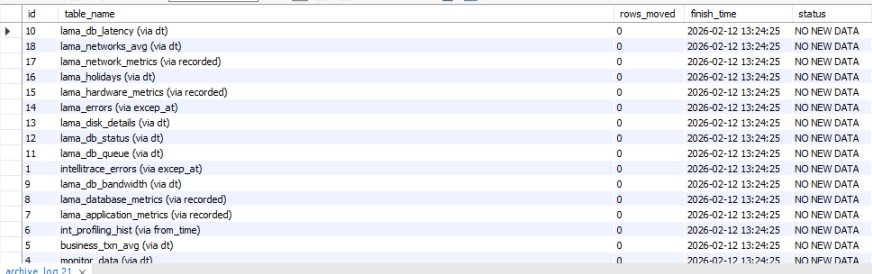
Step 4: We need to create the archive_log table in your archive database. This table will record which table was processed, how many rows were moved, and exactly when it finished.
CREATE TABLE IF NOT EXISTS applicarearchive.archive_log (
    id INT AUTO_INCREMENT PRIMARY KEY,
    table_name VARCHAR(255),
    rows_moved INT,
    finish_time TIMESTAMP DEFAULT CURRENT_TIMESTAMP,
    status VARCHAR(255)
);
Explanation of the Columns:
id: A unique number for every entry.
table_name: Records the table name (and the column name used, e.g.,
oshistory_detail [dt]).rows_moved: The number of records successfully transferred for "Yesterday".
finish_time: The exact date and time the backup for that specific table completed.
status: The
statuscolumn is your best friend. If a table fails because of a schema change (like a missing column in the archive), you will see "FAIL: Could not find matching table/columns" immediately.
Step 5: Execute query to see the results. It will show you the most recent backups at the top.
SELECT * FROM applicarearchive.archive_log ORDER BY finish_time DESC;