
By default, the Applicare Derby database is configured to run on a laptop and is suitable for testing with Applicare with One or two agents. If the Derby database is used for POCs or testing scenarios that involve a higher no. of agents and transactions, you should increase the amount of memory allocated to Derby.
Step 1: Stop the Derby database.
Step 2: Navigate to the directory listed below.
<Applicare_home_directory>\javadb\binFor Windows
Edit the startNetworkServer.bat file. Locate the two -Xmx, parameter within the file and update both values as needed.
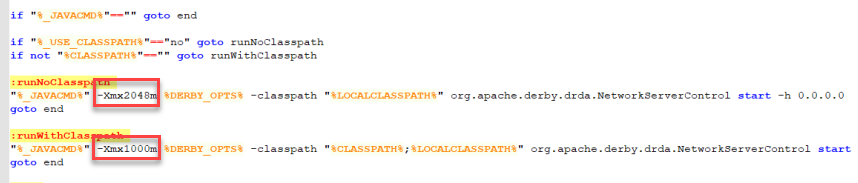
For Linux
Edit the startNetworkServer.sh file. Find the -Xmx parameter within the file and adjust its value accordingly.
