
Set Up SMTP for Yahoo Mail

Step 1: Log in to your Yahoo mail account.

Step 2: Click on your Yahoo account icon and then select Account info.
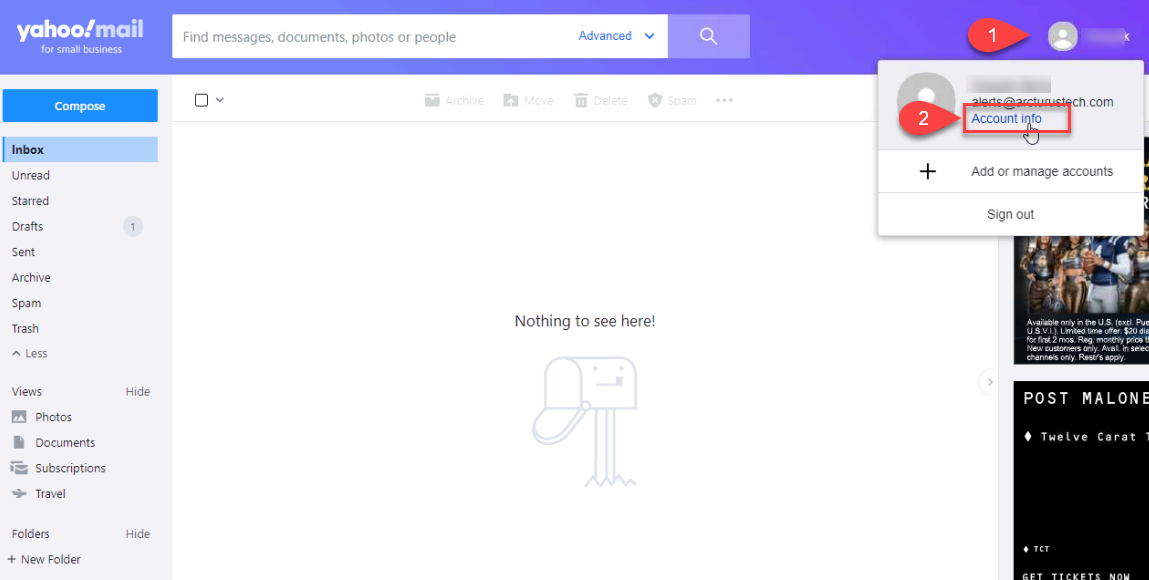
Screenshot 1 — Set Up SMTP for Yahoo Mail

Step 3: Click on Manage App Passwords option under the Account Security & Privacy section.
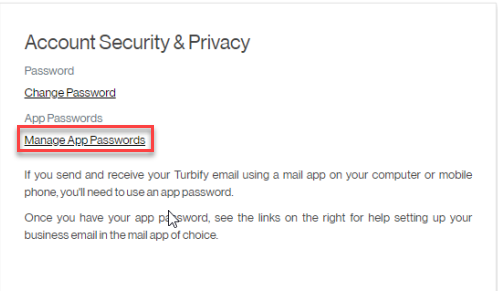
Screenshot 2 — Set Up SMTP for Yahoo Mail

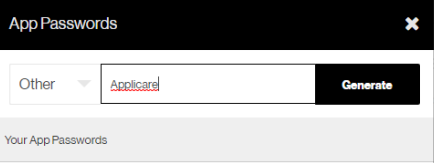
Step 4: A popup window for app will appear, Click on Other from the select your app dropdown menu, enter "Applicare" in the text box and click the generate button. Once the app password is generated, copy it and save it securely.
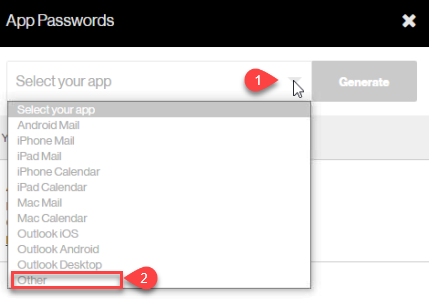
Screenshot 3 — Set Up SMTP for Yahoo Mail

Screenshot 4 — Set Up SMTP for Yahoo Mail

Monitoring with Applicare

Was this article helpful?

Votes and follows are kept by Zendesk, so they need a Help Center account. These buttons open this article there.

Opens Zendesk · needs internet and sign-in

Still stuck? Contact support