
To access data via the REST API, generate a API token in Applicare and include it in your request.
Token Generation
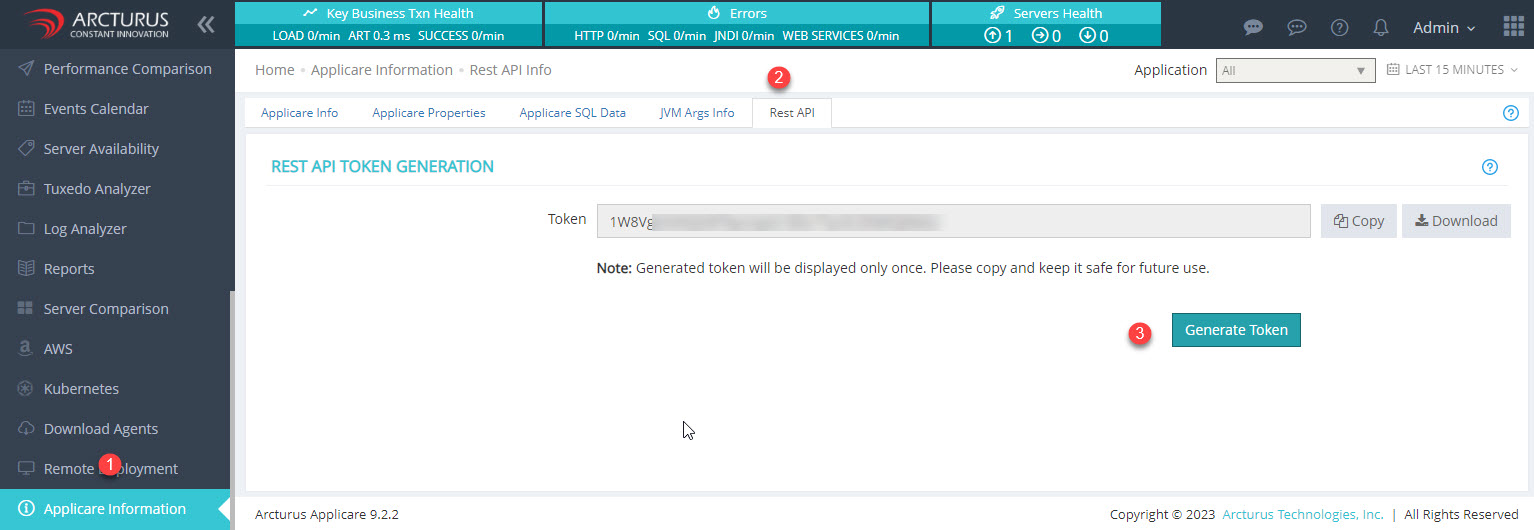
Navigate to Menu> Applicare Information > Rest API and click the Generate Token button. The newly generated token will appear in the Token field. This token is shown only once, So be sure to copy and securely store it for future use. The Controller saves the token in an encrypted format. Once a new token is generated old token becomes invalid.
REST APIs retrieve details from the controller
Authentication - API Key Authentication.
Token - One token per controller.
Token Validity - The token expires either when a new token is issued or if the Applicare license expires. After renewing the license, the existing token will remain valid.
Request content details
Method Type: POST
Content-Type: application/json
REST_API_URL: Controller_Protocol://Controller_IP:Controller_Port/applicare/restapi
Header: X-API-Key: TOKEN_VALUE
REQUEST_BODY: REST API details to fetch
CA_CERTIFICATE_FILE: For SSL Certificate
Response content details
Content-Type: application/jsonSuccess Response
{"status":"success","details":[{"name": "Google","state": "Failed"}]}
Failed Response
{"status":"error","details":[{"error": "Unauthorized. Token is missing or invalid"}]}
status - It displays the response is success or failure
details - Response message (JSON Array)CURL Syntax
HTTP:
curl -H "X-API-Key: TOKEN_VALUE" -H "Content-Type: application/json" -X POST -d REQUEST_BODY REST_API_URL
HTTPS:
curl --cacert CA_CERTIFICATE_FILE -H "X-API-Key: TOKEN_VALUE" -H "Content-Type: application/json" -X POST -d REQUEST_BODY REST_API_URL
Parameters:
CA_CERTIFICATE_FILE: .crt (or) .pem file location
TOKEN_VALUE: Generated Token value from Applicare Console
REQUEST_BODY: REST API details to fetch
REST_API_URL: Controller_Protocol://Controller_IP:Controller_Port/applicare/restapi
Controller_Protocol: Applicare Controller running protocol (http or https)
Controller_IP: Applicare Controller running IP or domain name
Controller_Port: Applicare Controller running Port
For example, let us consider the below values
CA_CERTIFICATE_FILE: D:\applicare.pem
TOKEN_VALUE: 123456789
REST_API_URL:
HTTP: http://localhost:8880/applicare/restapi
HTTPS: https://localhost:8443/applicare/restapi
REQUEST_BODY details for Various API
1. To get the status of all active synthetic transactions
{"\q\":\"syntheticAllTransactionStatus\"}CURL e.g.
HTTP:
curl -H "X-API-Key: 123456789" -H "Content-Type: application/json" -X POST -d {\"q\":\"syntheticAllTransactionStatus\"} http://localhost:8880/applicare/restapi
HTTPS:
curl --cacert D:\applicare.pem -H "X-API-Key: 123456789" -H "Content-Type: application/json" -X POST -d {\"q\":\"syntheticAllTransactionStatus\"} https://localhost:8443/applicare/restapi
Response
{"status":"success","details": [{"name": "Google","state": "Failed"},
{"name": "google","state": "Queued"},{"name": "Json","state":"Success"}]}
name - Synthetic Transaction Name
state - State of the transaction. (Success, Failed or Queued)
2. To retrieve details of all active synthetic transactions
{\"q\":\"syntheticAllTransactionDetails\"}CURL e.g.
HTTP:
curl -H "X-API-Key: 123456789" -H "Content-Type: application/json" -X POST -d {\"q\":\"syntheticAllTransactionDetails\"} http://localhost:8880/applicare/restapi
HTTPS:
curl --cacert D:\applicare.pem -H "X-API-Key: 123456789" -H "Content-Type: application/json" -X POST -d {\"q\":\"syntheticAllTransactionDetails\"} https://localhost:8443/applicare/restapi
Response
{"status":"success","details":[{"group": "Default","app": "Applicare",
"name": "Google","node": "ApplicareAdmin","state": "Failed","lastChecked": 1657724700000,
"executionTime": 21040,"message": ""},{"group": "Default","app":"","name": "Json",
"node": "ApplicareAdmin","state": "Success","lastChecked":1657724700000,
"executionTime": 316,"message": ""}]}
group - Name of the group
app - Name of the application
name - Name of the synthetic transaction
node- Node where the transaction executed
state - State of the transaction. (Success, Failed or Queued)
lastChecked - Last execution time
executionTime - Time taken for the transaction. Value in milliseconds
3. To get the transaction status based on transaction names
{\"q\":\"syntheticTransactionStatus\",\"txnname\":\"TXN_NAME1,TXN_NAME2\"}TXN_NAME1, TXN_NAME2 - Name of synthetic transactions
cURL e.g.
a. To get the transaction status for single transaction
HTTP:
curl -H "X-API-Key: 123456789" -H "Content-Type: application/json" -X POST -d {\"q\":\"syntheticTransactionStatus\",\"txnname\":\"00001\"} http://localhost:8880/applicare/restapi
HTTPS:
curl --cacert D:\applicare.pem -H "X-API-Key: 123456789" -H "Content-Type: application/json" -X POST -d {\"q\":\"syntheticTransactionStatus\",\"txnname\":\"00001\"} https://localhost:8443/applicare/restapi
Response
{"status":"success","details": [{"name": "00001","state": "Failed"}]}b. To get the transaction status for multiple transactions
HTTP:
curl -H "X-API-Key: 123456789" -H "Content-Type: application/json" -X POST -d {\"q\":\"syntheticTransactionStatus\",\"txnname\":\"00001,00002\"} http://localhost:8880/applicare/restapi
HTTPS:
curl --cacert D:\applicare.pem -H "X-API-Key: 123456789" -H "Content-Type: application/json" -X POST -d {\"q\":\"syntheticTransactionStatus\",\"txnname\":\"00001,00002\"} https://localhost:8443/applicare/restapi
Response
{"status":"success","details": [{"name": "00001","state": "Failed"},
{"name": "00002","state":"Success"}]}
4. To get the transaction status based on applications
{\"q\":\"syntheticTransactionStatus\",\"appname\":\"APP_NAME1,APP_NAME2\"}APP_NAME1, APP_NAME2 - Name of the Application which synthetic transactions was assigned.
CURL e.g.
a. To retrieve transaction the status for single application
HTTP:
curl -H "X-API-Key: 123456789" -H "Content-Type: application/json" -X POST -d {\"q\":\"syntheticTransactionStatus\",\"appname\":\"TestApp\"} http://localhost:8880/applicare/restapi
HTTPS:
curl --cacert D:\applicare.pem -H "X-API-Key: 123456789" -H "Content-Type: application/json" -X POST -d {\"q\":\"syntheticTransactionStatus\",\"appname\":\"TestApp\"} https://localhost:8443/applicare/restapi
Response
{"status":"success","details":[{"name":"00004","state":"Queued"},
{"name":"10jmeter","state":"Success"}]}
b. To get the transaction status for multiple applications
HTTP:
curl -H "X-API-Key: 123456789" -H "Content-Type: application/json" -X POST -d {\"q\":\"syntheticTransactionStatus\",\"appname\":\"TestApp,Applicare\"} http://localhost:8880/applicare/restapi
HTTPS:
curl --cacert D:\applicare.pem -H "X-API-Key: 123456789" -H "Content-Type: application/json" -X POST -d {\"q\":\"syntheticTransactionStatus\",\"appname\":\"TestApp,Applicare\"} https://localhost:8443/applicare/restapi
Response
{"status":"success","details":[{"name":"00004","state":"Queued"},
{"name":"10jmeter","state":"Success"},{"name":"Error","state":"Failed"},
{"name":"Google","state":"Failed"}]}
5. To get the transaction details based on transaction names
{\"q\":\"syntheticTransactionDetails\",\"txnname\":\"TXN_NAME1,TXN_NAME2\"}TXN_NAME1, TXN_NAME2 - Name of synthetic transactions
CURL e.g.
a. To get the transaction details for single transaction
HTTP:
curl -H "X-API-Key: 123456789" -H "Content-Type: application/json" -X POST -d {\"q\":\"syntheticTransactionDetails\",\"txnname\":\"00001\"} http://localhost:8880/applicare/restapi
HTTPS:
curl --cacert D:\applicare.pem -H "X-API-Key: 123456789" -H "Content-Type: application/json" -X POST -d {\"q\":\"syntheticTransactionDetails\",\"txnname\":\"00001\"} https://localhost:8443/applicare/restapi
Response
{"status":"success","details":[{"group":"Default","app":"","name":"00001","node":"Agent1",
"state":"Queued","lastChecked":0,"executionTime":0,"message":""}]}
b. To get the transaction details for multiple transactions
HTTP:
curl -H "X-API-Key: 123456789" -H "Content-Type: application/json" -X POST -d {\"q\":\"syntheticTransactionDetails\",\"txnname\":\"00001,00002\"} http://localhost:8880/applicare/restapi
HTTPS:
curl --cacert D:\applicare.pem -H "X-API-Key: 123456789" -H "Content-Type: application/json" -X POST -d {\"q\":\"syntheticTransactionDetails\",\"txnname\":\"00001,00002\"} https://localhost:8443/applicare/restapi
Response
{"status":"success","details":[{"group":"Default","app":"","name":"00001","node":"Agent1",
"state":"Queued","lastChecked":0,"executionTime":0,"message":""},
{"group":"Default","app":"","name":"00002","node":"ApplicareAdmin","state":"Success",
"lastChecked":1657878180000,"executionTime":116720,"message":""}]}
6. To get the transaction details based on applications
{\"q\":\"syntheticTransactionDetails\",\"appname\":\"APP_NAME1,APP_NAME2\"}APP_NAME1, APP_NAME2 - Name of the Application which synthetic transactions was assigned.
CURL e.g.
a. To get the transaction for single application
HTTP:
curl -H "X-API-Key: 123456789" -H "Content-Type: application/json" -X POST -d {\"q\":\"syntheticTransactionDetails\",\"appname\":\"TestApp\"} http://localhost:8880/applicare/restapi
HTTPS:
curl --cacert D:\applicare.pem -H "X-API-Key: 123456789" -H "Content-Type: application/json" -X POST -d {\"q\":\"syntheticTransactionDetails\",\"appname\":\"TestApp\"} https://localhost:8443/applicare/restapi
Response
{"status":"success","details":[{"group":"Default","app":"TestApp","name":"00004",
"node":"Agent2","state":"Queued","lastChecked":0,"executionTime":0,"message":""},
{"group":"Default","app":"TestApp","name":"10jmeter","node":"ApplicareAdmin",
"state":"Success","lastChecked":1657879080000,"executionTime":1469,"message":""}]}
b. To get the transaction details for multiple applications
HTTP:
curl -H "X-API-Key: 123456789" -H "Content-Type: application/json" -X POST -d {\"q\":\"syntheticTransactionDetails\",\"appname\":\"TestApp,Applicare\"} http://localhost:8880/applicare/restapi
HTTPS:
curl --cacert D:\applicare.pem -H "X-API-Key: 123456789" -H "Content-Type: application/json" -X POST -d {\"q\":\"syntheticTransactionDetails\",\"appname\":\"TestApp,Applicare\"} https://localhost:8443/applicare/restapi
Response
{"status":"success","details":[{"group":"Default","app":"TestApp","name":"00004",
"node":"Agent2","state":"Queued","lastChecked":0,"executionTime":0,"message":""},
{"group":"Default","app":"TestApp","name":"10jmeter","node":"ApplicareAdmin",
"state":"Success","lastChecked":1657879080000,"executionTime":1469,"message":""},
{"group":"Default","app":"Applicare","name":"Error","node":"ApplicareAdmin",
"state":"Failed","lastChecked":1657879020000,"executionTime":24432,"message":""},
{"group":"Default","app":"Applicare","name":"Google","node":"ApplicareAdmin",
"state":"Failed","lastChecked":1657879080000,"executionTime":21031,"message":""}]}