
Finding the Java Installation Directory

Follow these steps to find Java Installation path.

Steps 1: Execute below command

which java
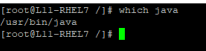
Screenshot 1 — Finding the Java Installation Directory

Steps 2: Run the ll command with the directory path obtained from the previous command.

e.g. ll /usr/bin/java

Screenshot 2 — Finding the Java Installation Directory

Steps 3: Run the ll command with the directory path obtained from the previous command. This will reveal the path to the Java installation directory.

e.g. ll /etc/alternatives/java

Screenshot 3 — Finding the Java Installation Directory

Monitoring with Applicare

Was this article helpful?

Votes and follows are kept by Zendesk, so they need a Help Center account. These buttons open this article there.

Opens Zendesk · needs internet and sign-in

Still stuck? Contact support