Java issues encountered during wrapper installation

Check this against your version

This article was last updated on Aug 22, 2024, before Applicare 10.0 was released (Jun 19, 2026), and has not been re-checked for Applicare 10.0. Confirm the steps in your environment or contact Support.


If you encounter the following Java error during while wrapper installation, follow these steps.

Screenshot 1 — Java issues encountered during wrapper installation

Step 1: Navigate to the "<Applicare SingleAgent_home_path>\Wrapper\windows" directory and edit the java_dir.config.

Step 2: Save the path to the Java installation directory including bin subdirectory, where the application is running.

Example: C:\javajdk1_8_0_265\bin

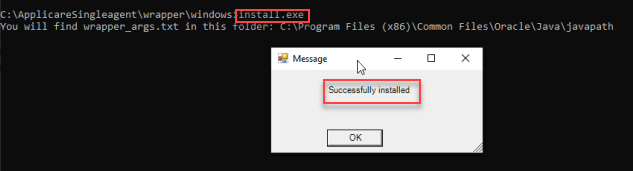
Step 3: Run the install.exe file as an administration to install Applicare SingleAgent.

Screenshot 2 — Java issues encountered during wrapper installation

Was this article helpful?

Votes and follows are kept by Zendesk, so they need a Help Center account. These buttons open this article there.

Opens Zendesk · needs internet and sign-in

Still stuck? Contact support