To enable OpenTelemetry auto-instrumentation for your .NET application and send traces to Applicare, you will need to apply configuration changes in both your Dockerfile and your application's YAML deployment script (e.g., Kubernetes Deployment, Docker Compose file, or other container orchestration tool's configuration).
Step 1: Modify your Dockerfile
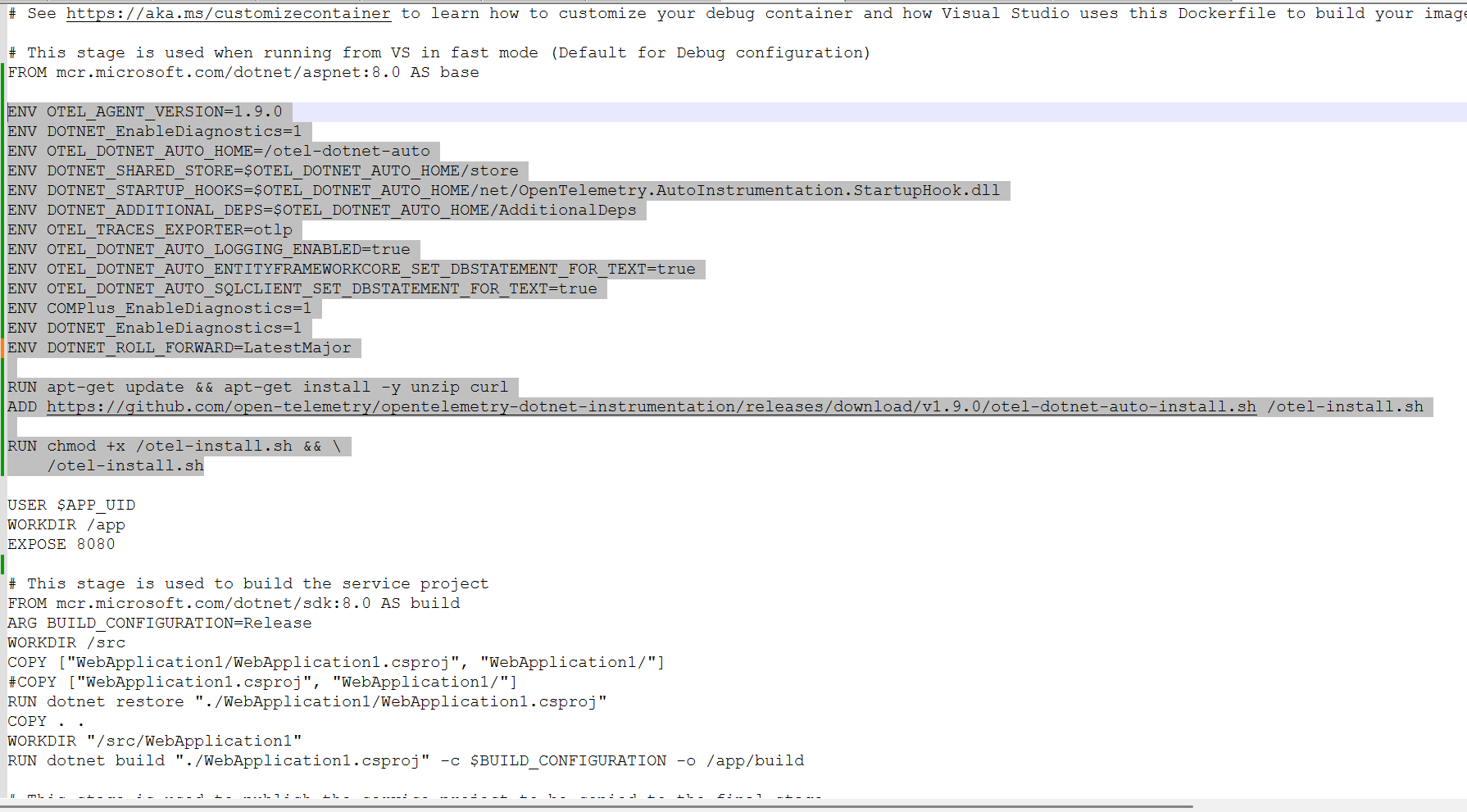
Add the following lines to your application's Dockerfile. These commands will install necessary utilities, download the OpenTelemetry .NET auto-instrumentation setup script, execute it.
Note: The apt-get commands assume a Debian/Ubuntu-based base image (e.g., mcr.microsoft.com/dotnet/aspnet:8.0-alpine would use apk add --no-cache instead). Adjust package manager commands as per your base image.
ENV OTEL_AGENT_VERSION=1.9.0
ENV DOTNET_EnableDiagnostics=1
ENV OTEL_DOTNET_AUTO_HOME=/otel-dotnet-auto
ENV DOTNET_SHARED_STORE=$OTEL_DOTNET_AUTO_HOME/store
ENV DOTNET_STARTUP_HOOKS=$OTEL_DOTNET_AUTO_HOME/net/OpenTelemetry.AutoInstrumentation.StartupHook.dll
ENV DOTNET_ADDITIONAL_DEPS=$OTEL_DOTNET_AUTO_HOME/AdditionalDeps
ENV OTEL_TRACES_EXPORTER=otlp
ENV OTEL_DOTNET_AUTO_LOGGING_ENABLED=true
ENV OTEL_DOTNET_AUTO_ENTITYFRAMEWORKCORE_SET_DBSTATEMENT_FOR_TEXT=true
ENV OTEL_DOTNET_AUTO_SQLCLIENT_SET_DBSTATEMENT_FOR_TEXT=true
ENV COMPlus_EnableDiagnostics=1
ENV DOTNET_EnableDiagnostics=1
ENV DOTNET_ROLL_FORWARD=LatestMajor

RUN apt-get update && apt-get install -y unzip curl
ADD https://github.com/open-telemetry/opentelemetry-dotnet-instrumentation/releases/download/v1.9.0/otel-dotnet-auto-install.sh /otel-install.sh

RUN chmod +x /otel-install.sh && \
    /otel-install.sh
Step 2: Configure Environment Variables in your YAML Deployment
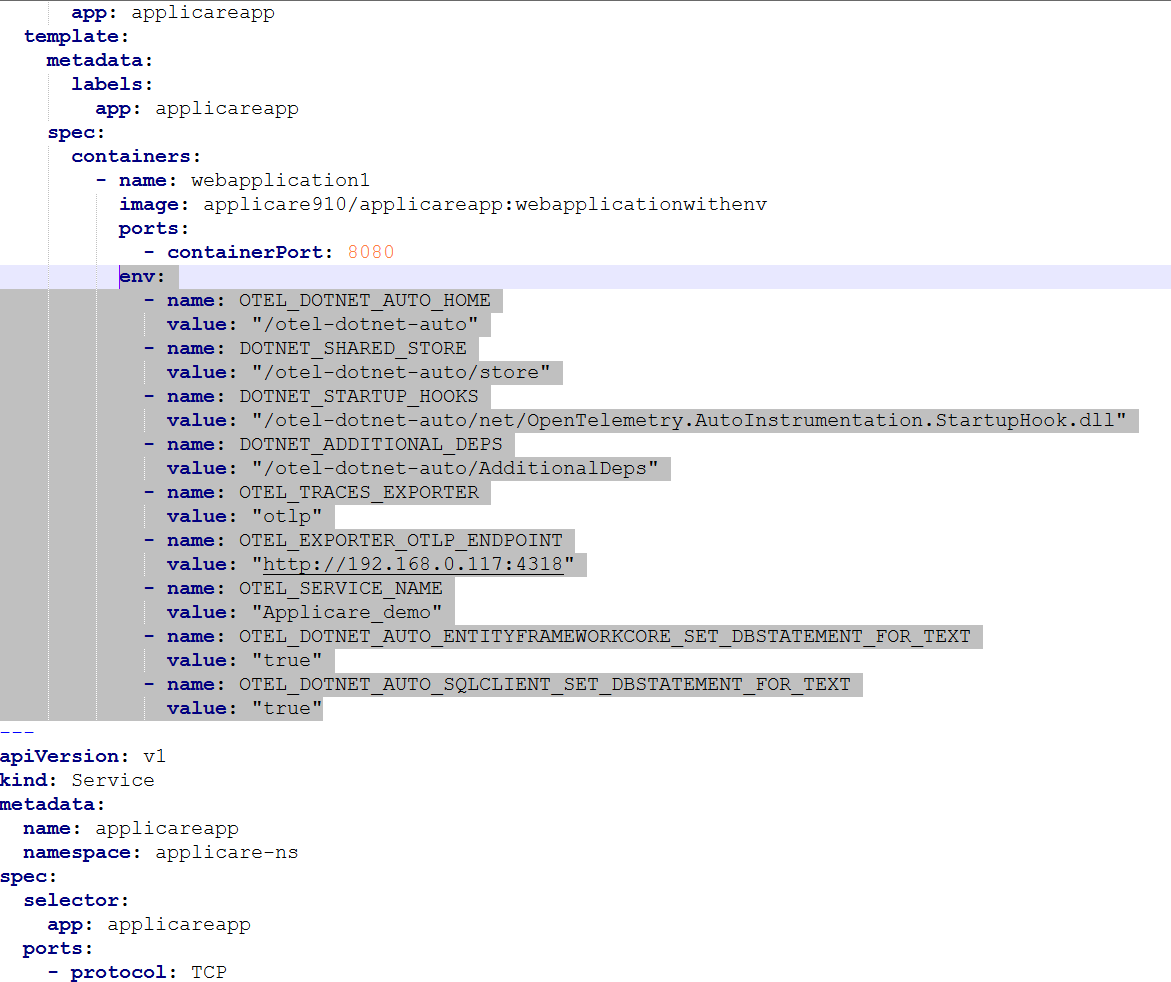
Add the following environment variables to the container definition section of your application's YAML deployment file (e.g., under env: in a Kubernetes Deployment's container specification, or environment: in a Docker Compose service). These variables instruct the OpenTelemetry auto-instrumentation how to behave and where to send the telemetry data.
OTEL_DOTNET_AUTO_HOME="/otel-dotnet-auto"
DOTNET_SHARED_STORE="/otel-dotnet-auto/store"
DOTNET_STARTUP_HOOKS="/otel-dotnet-auto/net/OpenTelemetry.AutoInstrumentation.StartupHook.dll"
DOTNET_ADDITIONAL_DEPS="/otel-dotnet-auto/AdditionalDeps"
OTEL_TRACES_EXPORTER="otlp"
OTEL_EXPORTER_OTLP_ENDPOINT="http://<APPLICARE_CONTROLLER_IP>:4318"
OTEL_SERVICE_NAME="<APPLICARE_AGENT_NAME>"
OTEL_DOTNET_AUTO_ENTITYFRAMEWORKCORE_SET_DBSTATEMENT_FOR_TEXT="true"
OTEL_DOTNET_AUTO_SQLCLIENT_SET_DBSTATEMENT_FOR_TEXT="true"
Before deploying your application, ensure you replace the following placeholders:
<APPLICARE_CONTROLLER_IP>: Replace this with the actual IP address or hostname of your Applicare controller instance.<APPLICARE_AGENT_NAME>: Provide a unique, descriptive name that will help you identify this specific container or application within the Applicare monitoring console.
Sample Dockerfile with the above changes.
Sample YAML with the above changes.