Issue with Java during installing wrapper on Linux
Updated Aug 23, 2024javalinuxsingleagentApplies to 10.0, 9.2Not yet checked for Applicare 10.0
Check this against your version
This article was last updated on Aug 23, 2024, before Applicare 10.0 was released (Jun 19, 2026), and has not been re-checked for Applicare 10.0. Confirm the steps in your environment or contact Support.
Step 1: Navigate to "<Applicare SingleAgent_home_path>\Wrapper\Linux" directory and edit the config.sh file.
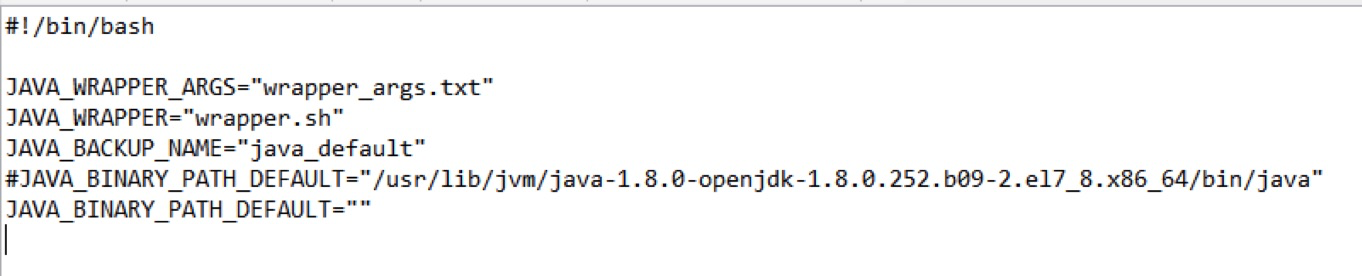
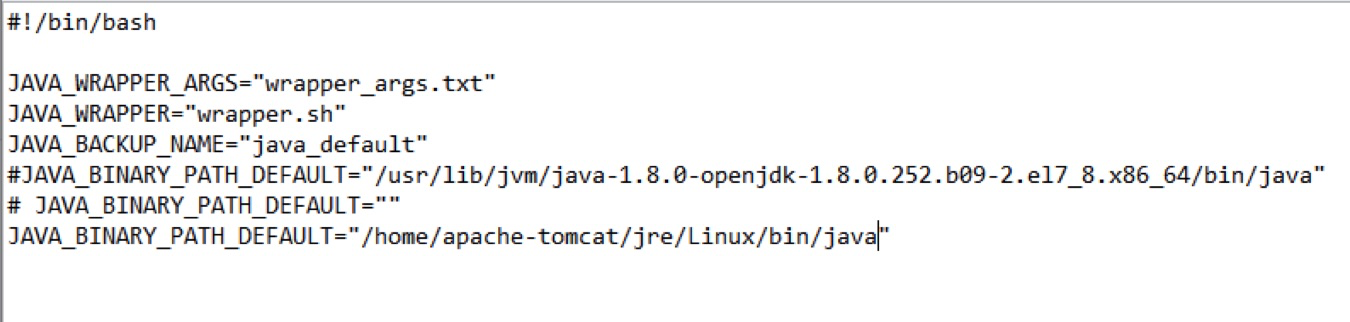
Step 2: Copy the line that says JAVA_BINARY_PATH_DEFAULT="", comment it out and paste it on the next line. Then, insert the path to the java directory in double quotes as shown below and save the file.
e.g. /home/apache-tomcat/jre/Linux/bin/java
Before changes config.sh file
After changes config.sh file
Step 3: To install Applicare Singleagent execute install.sh file.
Was this article helpful?
Votes and follows are kept by Zendesk, so they need a Help Center account. These buttons open this article there.