Domain Configuration

Check this against your version

This article was last updated on Sep 13, 2024, before Applicare 10.0 was released (Jun 19, 2026), and has not been re-checked for Applicare 10.0. Confirm the steps in your environment or contact Support.


You need to save WebLogic domain information in Applicare before deploying the Applicare agent to WebLogic servers.

Screenshot 1 — Domain Configuration

Configuration

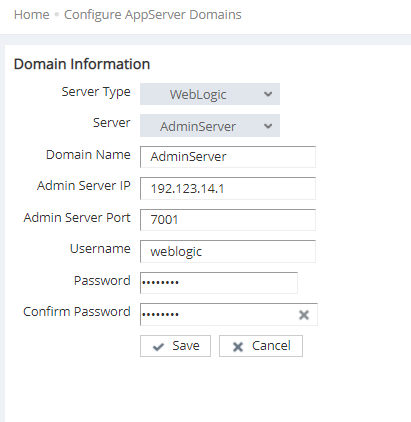
Click the "New" button to add a new domain. Enter the domain name and the Admin Server connection details for the domain.

Screenshot 2 — Domain Configuration

Monitoring with Applicare

Was this article helpful?

Votes and follows are kept by Zendesk, so they need a Help Center account. These buttons open this article there.

Opens Zendesk · needs internet and sign-in

Still stuck? Contact support