Before you begin .NET monitoring installation, ensure the Applicare Collector is already installed and actively running on your Applicare Controller machine. For detailed instructions on setting up the collector, please refer to our guide: Applicare Collector Configuration on Linux/Ubuntu
To install the operator in an existing cluster, install cert-manager, if it is not already installed.
kubectl apply -f https://github.com/cert-manager/cert-manager/releases/download/v1.18.2/cert-manager.yamlInstall Opentelemetry operator in your Kubernetes cluster.
kubectl apply -f https://github.com/open-telemetry/opentelemetry-operator/releases/latest/download/opentelemetry-operator.yamlCreate a file dotnet-instrumentation.yaml and add the below content and save it.
apiVersion: v1
kind: Namespace
metadata:
  name: applicareotel-ns
  labels:
    name: applicareotel-ns

---

apiVersion: opentelemetry.io/v1alpha1
kind: Instrumentation
metadata:
  name: dotnet-instrumentation
  namespace: applicareotel-ns
spec:
  exporter:
    endpoint: http://<APPLICARE_CONTROLLER_IP>:4318
  propagators:
    - tracecontext
    - baggage
  dotnet:
    image: ghcr.io/open-telemetry/opentelemetry-operator/autoinstrumentation-dotnet:1.9.0
Before deploying the above Instrumentation, ensure you replace the following placeholders:
<APPLICARE_CONTROLLER_IP>: Replace this with the actual IP address or hostname of your Applicare controller instance
After creating the yaml file, execute the command below.
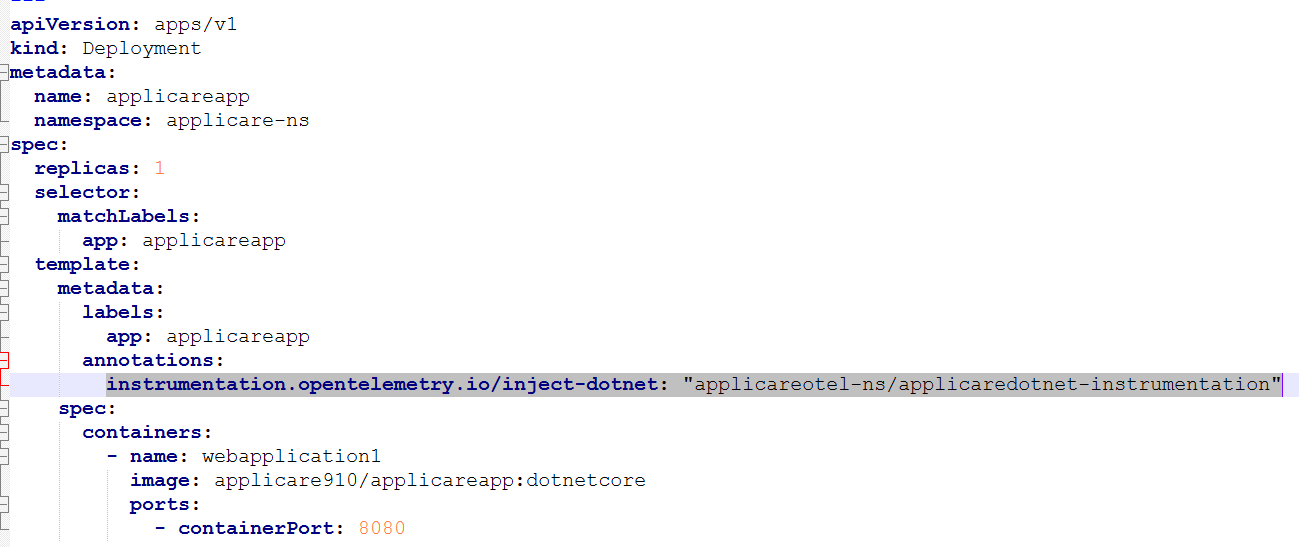
kubectl apply -f dotnet-instrumentation.yamlAdd the below annotation in your application and redeploy the application.
instrumentation.opentelemetry.io/inject-dotnet: "applicareotel-ns/applicaredotnet-instrumentation"