
X.509 Certificate-Based Authentication
X.509 Cert-based authentication provides an easy and secure way to access Applicare REST APIs. Below are the details on enabling it.
1. Bring down the Applicare controller.
2. Navigate to <Applicare controller home directory>\server\conf and open the server.xml file.
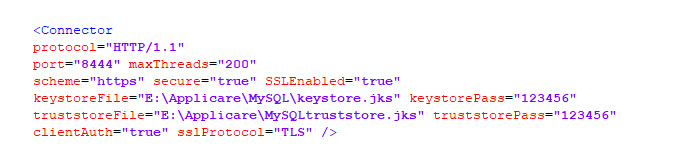
3. Add a new connector as detailed below, specifying the Keystore and Truststore file paths password and set the clientAuth to true.
<Connector protocol="HTTP/1.1" port="8444" maxThreads="200" scheme="https" secure="true" SSLEnabled="true" keystoreFile="<keystorefile.jks>" keystorePass="password" truststoreFile="<truststorefile.jks>" truststorePass="password" clientAuth="true" sslProtocol="TLS" />
Example:
4. Restart the Applicare Controller.
Request content details
Method Type: POST
Content-Type: application/json
REST_API_URL: Controller_Protocol://Controller_IP:Controller_Port/applicare/restapi
REQUEST_BODY: REST API details to fetch
CA_CERTIFICATE_FILE: CA Certificate file for SSL.
CLIENT_CERTIFICATE_FILE: Client Certificate file for client side authentication. (.p12) file
PassphrasePassword: Password for the .p12 file at the time of file generation.
Request Content Information
Content-Type: application/jsonSuccess Response
{"status":"success","details":[{"name": "Google","state": "Failed"}]}
Failed Response
{"status":"error","details":[{"error": "Unauthorized. Token is missing or invalid"}]}
status - It displays the response is success or failure
details - Response message (JSON Array)cURL Command Syntax
HTTPS:
curl --cacert CA_CERTIFICATE_FILE --cert CLIENT_CERTIFICATE_FILE:PassphrasePassword -H "Content-Type: application/json" -X POST -d REQUEST_BODY REST_API_URL
Fields:
CA_CERTIFICATE_FILE : Location of the .crt (or) .pem certificate file
CLIENT_CERTIFICATE_FILE: Client certificate file with .p12 extension
PassphrasePassword: Passphrase for the client certificate file
REQUEST_BODY: Details of the REST API request
REST_API_URL: Controller_Protocol://Controller_IP:Controller_Port/applicare/restapi
Controller_Protocol: Applicare Controller running protocol (http or https)
Controller_IP: Applicare Controller running IP or domain name
Controller_Port: Applicare Controller running Port
For example, Consider the following values:
CA_CERTIFICATE_FILE: D:\applicare.pem
.P12_FILE: D:\client.p12
PassphrasePassword: clientpass
REST_API_URL: https://localhost:8443/applicare/restapi
REQUEST_BODY details for Various API
1. To retrieve the status of all active synthetic transactions
{"\q\":\"syntheticAllTransactionStatus\"}cURL Example
curl --cacert D:\applicare.pem --cert D:\client.p12:changeit -H "Content-Type: application/json" -X POST -d {\"q\":\"syntheticAllTransactionStatus\"} https://localhost:8444/applicare/restapi
Response
{"status":"success","details": [{"name": "Google","state": "Failed"},
{"name": "google","state": "Queued"},{"name": "Json","state":"Success"}]}
name - Synthetic Transaction Name
state - State of the transaction. (Success, Failed or Queued)
2. To retrieve details of all active synthetic transactions
{\"q\":\"syntheticAllTransactionDetails\"}cURL Example
curl --cacert D:\applicare.pem --cert D:\client.p12:changeit -H "Content-Type: application/json" -X POST -d {\"q\":\"syntheticAllTransactionDetails\"} https://localhost:8443/applicare/restapi
Response
{"status":"success","details":[{"group": "Default","app": "Applicare",
"name": "Google","node": "ApplicareAdmin","state": "Failed","lastChecked": 1657724700000,
"executionTime": 21040,"message": ""},{"group": "Default","app":"","name": "Json",
"node": "ApplicareAdmin","state": "Success","lastChecked":1657724700000,
"executionTime": 316,"message": ""}]}
group - Group Name
app - Application Name
name - Synthetic Transaction Name
node- In Which Node it executes
state - State of the transaction. (Success, Failed or Queued)
lastChecked - Last execution time
executionTime - Time taken for the transaction. Value in milliseconds
3. To retrieve transaction status based on transaction names
{\"q\":\"syntheticTransactionStatus\",\"txnname\":\"TXN_NAME1,TXN_NAME2\"}TXN_NAME1, TXN_NAME2 - Name of synthetic transactions
cURL Example
a. To get the transaction status for single transaction
curl --cacert D:\applicare.pem --cert D:\client.p12:changeit -H "Content-Type: application/json" -X POST -d {\"q\":\"syntheticTransactionStatus\",\"txnname\":\"00001\"} https://localhost:8443/applicare/restapi
Response
{"status":"success","details": [{"name": "00001","state": "Failed"}]}b. To get the transaction status for multiple transactions
curl --cacert D:\applicare.pem --cert D:\client.p12:changeit -H "Content-Type: application/json" -X POST -d {\"q\":\"syntheticTransactionStatus\",\"txnname\":\"00001,00002\"} https://localhost:8443/applicare/restapi
Response
{"status":"success","details": [{"name": "00001","state": "Failed"},
{"name": "00002","state":"Success"}]}
4. To retrieve the transaction status based on applications
{\"q\":\"syntheticTransactionStatus\",\"appname\":\"APP_NAME1,APP_NAME2\"}APP_NAME1, APP_NAME2 - Name of the Application which synthetic transactions was assigned.
cURL Example
a. To get the transaction status for single application
curl --cacert D:\applicare.pem --cert D:\client.p12:changeit -H "Content-Type: application/json" -X POST -d {\"q\":\"syntheticTransactionStatus\",\"appname\":\"TestApp\"} https://localhost:8443/applicare/restapi
Response
{"status":"success","details":[{"name":"00004","state":"Queued"},
{"name":"10jmeter","state":"Success"}]}
b. To get the transaction status for multiple applications
curl --cacert D:\applicare.pem --cert D:\client.p12:changeit -H "Content-Type: application/json" -X POST -d {\"q\":\"syntheticTransactionStatus\",\"appname\":\"TestApp,Applicare\"} https://localhost:8443/applicare/restapi
Response
{"status":"success","details":[{"name":"00004","state":"Queued"},
{"name":"10jmeter","state":"Success"},{"name":"Error","state":"Failed"},
{"name":"Google","state":"Failed"}]}
5. To get the transaction details based on transaction names
{\"q\":\"syntheticTransactionDetails\",\"txnname\":\"TXN_NAME1,TXN_NAME2\"}TXN_NAME1, TXN_NAME2 - Name of synthetic transactions
cURL Example
a. To get the transaction details for single transaction
curl --cacert D:\applicare.pem --cert D:\client.p12:changeit -H "Content-Type: application/json" -X POST -d {\"q\":\"syntheticTransactionDetails\",\"txnname\":\"00001\"} https://localhost:8443/applicare/restapi
Response
{"status":"success","details":[{"group":"Default","app":"","name":"00001","node":"Agent1",
"state":"Queued","lastChecked":0,"executionTime":0,"message":""}]}
b. To get the transaction details for multiple transactions
curl --cacert D:\applicare.pem --cert D:\client.p12:changeit -H "Content-Type: application/json" -X POST -d {\"q\":\"syntheticTransactionDetails\",\"txnname\":\"00001,00002\"} https://localhost:8443/applicare/restapi
Response
{"status":"success","details":[{"group":"Default","app":"","name":"00001","node":"Agent1",
"state":"Queued","lastChecked":0,"executionTime":0,"message":""},
{"group":"Default","app":"","name":"00002","node":"ApplicareAdmin","state":"Success",
"lastChecked":1657878180000,"executionTime":116720,"message":""}]}
6. To get the transaction details based on applications
{\"q\":\"syntheticTransactionDetails\",\"appname\":\"APP_NAME1,APP_NAME2\"}APP_NAME1, APP_NAME2 - Name of the application to which the synthetic transactions are assigned.
cURL Example
a. To get the transaction for single application
curl --cacert D:\applicare.pem --cert D:\client.p12:changeit -H "Content-Type: application/json" -X POST -d {\"q\":\"syntheticTransactionDetails\",\"appname\":\"TestApp\"} https://localhost:8443/applicare/restapi
Response
{"status":"success","details":[{"group":"Default","app":"TestApp","name":"00004",
"node":"Agent2","state":"Queued","lastChecked":0,"executionTime":0,"message":""},
{"group":"Default","app":"TestApp","name":"10jmeter","node":"ApplicareAdmin",
"state":"Success","lastChecked":1657879080000,"executionTime":1469,"message":""}]}
b. To retrieve transaction details for multiple applications
curl --cacert D:\applicare.pem --cert D:\client.p12:changeit -H "Content-Type: application/json" -X POST -d {\"q\":\"syntheticTransactionDetails\",\"appname\":\"TestApp,Applicare\"} https://localhost:8443/applicare/restapi
Response
{"status":"success","details":[{"group":"Default","app":"TestApp","name":"00004",
"node":"Agent2","state":"Queued","lastChecked":0,"executionTime":0,"message":""},
{"group":"Default","app":"TestApp","name":"10jmeter","node":"ApplicareAdmin",
"state":"Success","lastChecked":1657879080000,"executionTime":1469,"message":""},
{"group":"Default","app":"Applicare","name":"Error","node":"ApplicareAdmin",
"state":"Failed","lastChecked":1657879020000,"executionTime":24432,"message":""},
{"group":"Default","app":"Applicare","name":"Google","node":"ApplicareAdmin",
"state":"Failed","lastChecked":1657879080000,"executionTime":21031,"message":""}]}