
Step 1: Add the following line next to the From line in the Dockerfile that builds Nginx.
RUN apt-get update && \
apt-get install unzip -y && \
apt-get install curl -y && \
apt-get clean

RUN mkdir /usr/local/Applicare
WORKDIR /usr/local/Applicare
RUN curl $CONTROLLER_PROTOCOL://$CONTROLLER_IP:$CONTROLLER_PORT/applicare/standalone?filename=ApplicareSingleAgentLinux >ApplicareSingleAgentLinux.zip
RUN unzip ApplicareSingleAgentLinux.zip
RUN ["rm", "-frv", "/usr/local/Applicare/ApplicareSingleAgentLinux.zip"]
COPY startAgent.sh /usr/local/Applicare/agentscripts/startAgent.sh
COPY start_nginx.sh /usr/local/Applicare/start_nginx.sh
RUN chmod -R 755 /usr/local/Applicare
WORKDIR /usr/local/Applicare
CMD ["./start_nginx.sh"]
Replace the below values in the above command
CONTROLLER_PROTOCOL -> http (or) https
CONTROLLER_IP -> Applicare Controller IP
CONTROLLER_PORT -> Applicare Controller Port
Step 2: Create a file named start_nginx.sh with the following content:
#!/bin/bash# Start Nginx in the backgroundnginx -g "daemon off;" &# Start our Agent/usr/local/Applicare/startAgent.shStep 3: Create a file named startAgent.sh with the content below.
#!/bin/sh
SERVER_NAME=`hostname`_sa

export SERVER_NAME

if [ -z "$ARCTURUS_HOME" ]; then

ARCTURUS_HOME="/usr/local/Applicare"

fi

export ARCTURUS_HOME

JAVA_HOME_PATH=$JAVA_HOME

INBUILD_JAVA_PATH=$ARCTURUS_HOME/jre

export INBUILD_JAVA_PATH

if [[ $(uname -s) == "Darwin" ]]; then

  JAVA_HOME_PATH="$ARCTURUS_HOME/jre/mac/zulu-8_jre/Contents/Home"

else

  JAVA_HOME_PATH="$ARCTURUS_HOME/jre/linux/jre"

fi

#export JAVA_HOME

export JAVA_HOME_PATH

JAVA_OPTS="-noverify -Xmx1024m -Dserver.name=$SERVER_NAME -javaagent:$ARCTURUS_HOME/applicare-db-aspects.jar=verbosity=0,logfile=false,norestart-intellitrace=false -Darcturus_home=$ARCTURUS_HOME -XX:HeapDumpPath=/dev/null -Djava.library.path=.:$ARCTURUS_HOME/bin -Dapplicare.standalone=true"

export JAVA_OPTS

EXECUTABLE_NAME=$ARCTURUS_HOME/AgentStartHelper.jar

export EXECUTABLE_NAME

if [ -d "$JAVA_HOME_PATH/bin" ] ; then

 "$JAVA_HOME_PATH/bin"/java -jar $JAVA_OPTS $EXECUTABLE_NAME

else

 java -jar $JAVA_OPTS $EXECUTABLE_NAME

fi
Step 4: In the nginx.conf file, make the following changes:
a.) Comment out the existing log_format directive and add the new log_format as shown below.
log_format main '$remote_addr - $remote_user $time_iso8601 [$request_time] "$request" ' '$status $body_bytes_sent "$http_referer" ' '"$http_user_agent" "$http_x_forwarded_for"';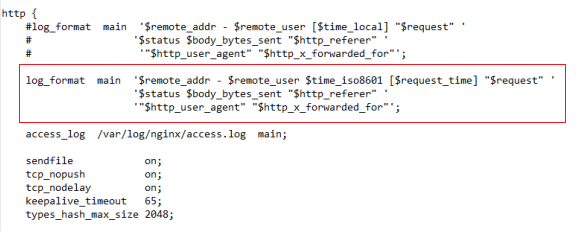
b.) Uncomment the access_log line if it is already commented.
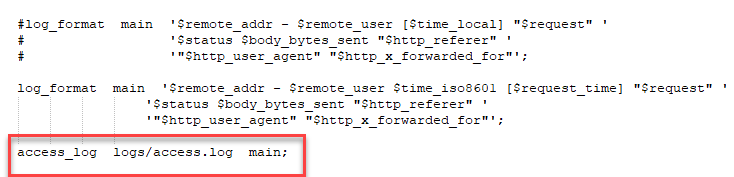
c.) Add the below lines inside the server module
location /nginx-status {stub_status on;allow 127.0.0.1;}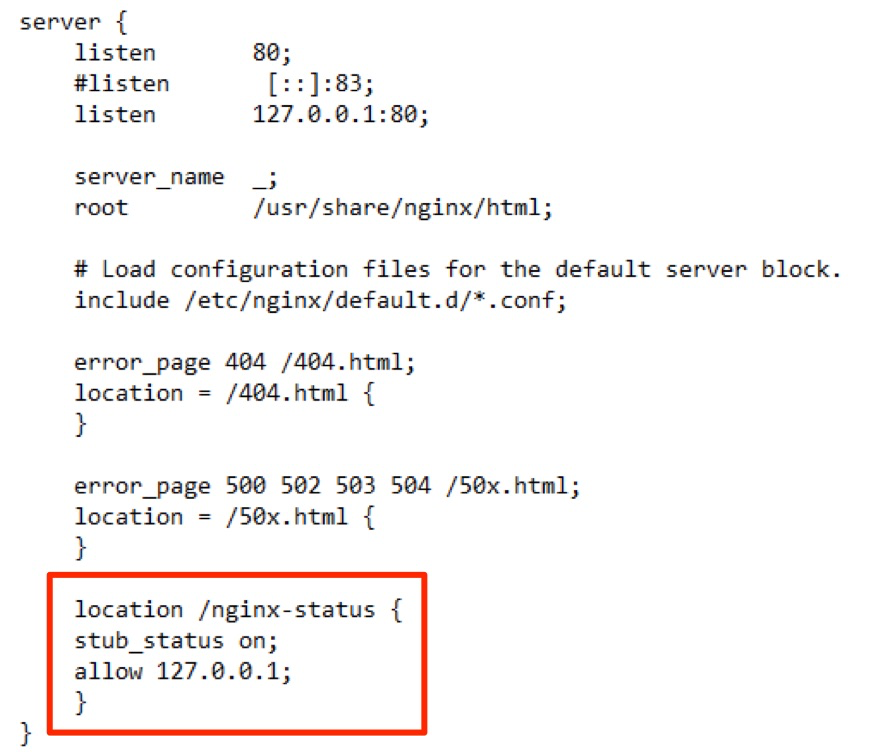
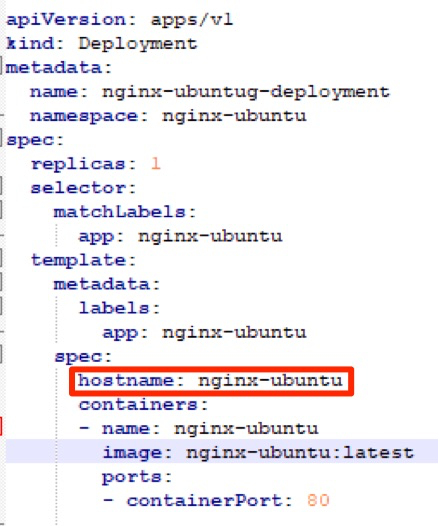
Step 5: Add the following line to the container specification in the YAML file that starts Nginx on Kubernetes.
hostname: <hostname>Replace <hostname> with the name which we need to add the agent in Applicare.
Step 6: Log in to the Applicare console, go to the Overview menu, select the newly added agent, and click the Edit button.
Step 7: Enable the "Add Nginx Configuration" checkbox and add the below value.
1. Log file path - <access log file location>
2. Nginx Host - 127.0.0.1
3. Nginx Port - <Nginx_Port>
4. Nginx Protocol - http (or) https
Click the update button to save.