Installing Applicare SingleAgent on WebLogic running on Linux

Check this against your version

This article was last updated on Mar 23, 2026, before Applicare 10.0 was released (Jun 19, 2026), and has not been re-checked for Applicare 10.0. Confirm the steps in your environment or contact Support.

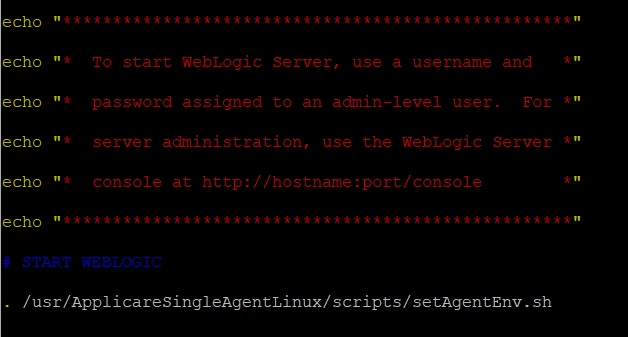
  1. Install Applicare SingleAgent in the machine where Weblogic is running.
  2. Navigate to the <weblogic_domain_path>\bin directory and add the following line to the startWebLogic.bat file:
. /<ApplicareSingleAgent_homepath>/scripts/setAgentEnv.sh
  • <ApplicareSingleagent_homepath>

    - The directory where the Applicare SingleAgent zip file has been extracted.

    Screenshot 1 — Installing Applicare SingleAgent on WebLogic running on Linux

  1. Restart Weblogic

For Other Docs - Click here

Was this article helpful?

Votes, comments and follows are kept by Zendesk, so they need a Help Center account. These buttons open this article there.

Opens Zendesk · needs internet and sign-in

Still stuck? Contact support