
Prerequisites
To monitor Node.js Applications, You need to configure both Node.js and Single agent. Ensure that both are running on the same machine:
- Single Agent
- Node.js Agent
Monitoring
1. Login into the Applicare console, go to the Download Agents screen, and download the SingleAgentLinux for Linux. Then, transfer the download file to the machine where the agent will be deployed.
- Extract the contents of the downloaded file and give the below permission for that extracted directory.
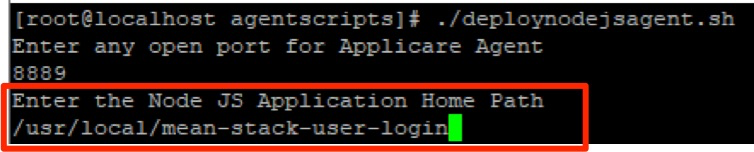
chmod -R 777 /usr/local/ApplicareSingleAgentLinux3a. Execute the deploynodejsagent.sh inside the agentscritpts extracted directory. After executing, the message "Enter any open port for Applicare Agent" will appear in the terminal window and enter any open port in it.

3b. Enter the Node.js home path where the application is running.
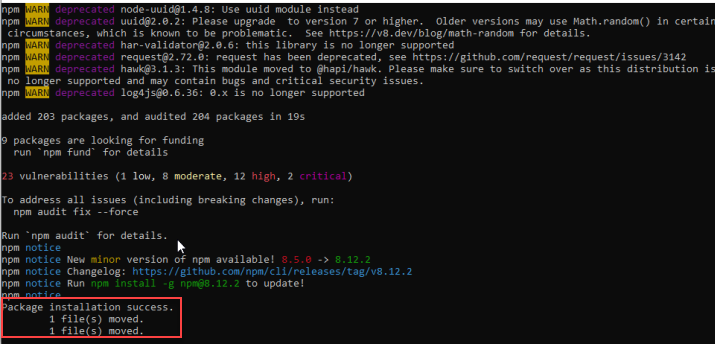
3c. Once the agent is successfully installed, You will see a message similar to the one shown below
4. Navigate to the Node.js application home directory and insert the following code at the beginning of the main file (usually called server.js or app.js).
var applicareConfig = require('./agent.config.js');var applicare = require('applicare-agent')(applicareConfig);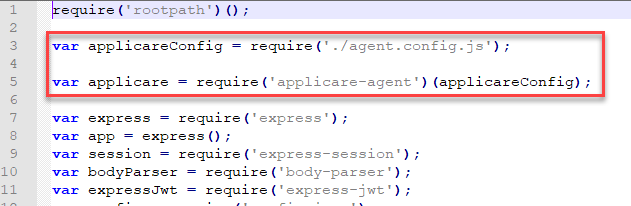
5. Restart the Node.js server.
- If systemctl is available on agent deployed Linux machine, execute installNodeJsAgentService.sh file in agentscripts directory.
To start as a service: execute ./installNodeJsAgentService.shIf systemctl is not there on agent deployed machine, To start in background mode execute below command in agentscripts directory on agent home directory.
nohup ./startNodeJsAgent.sh &